
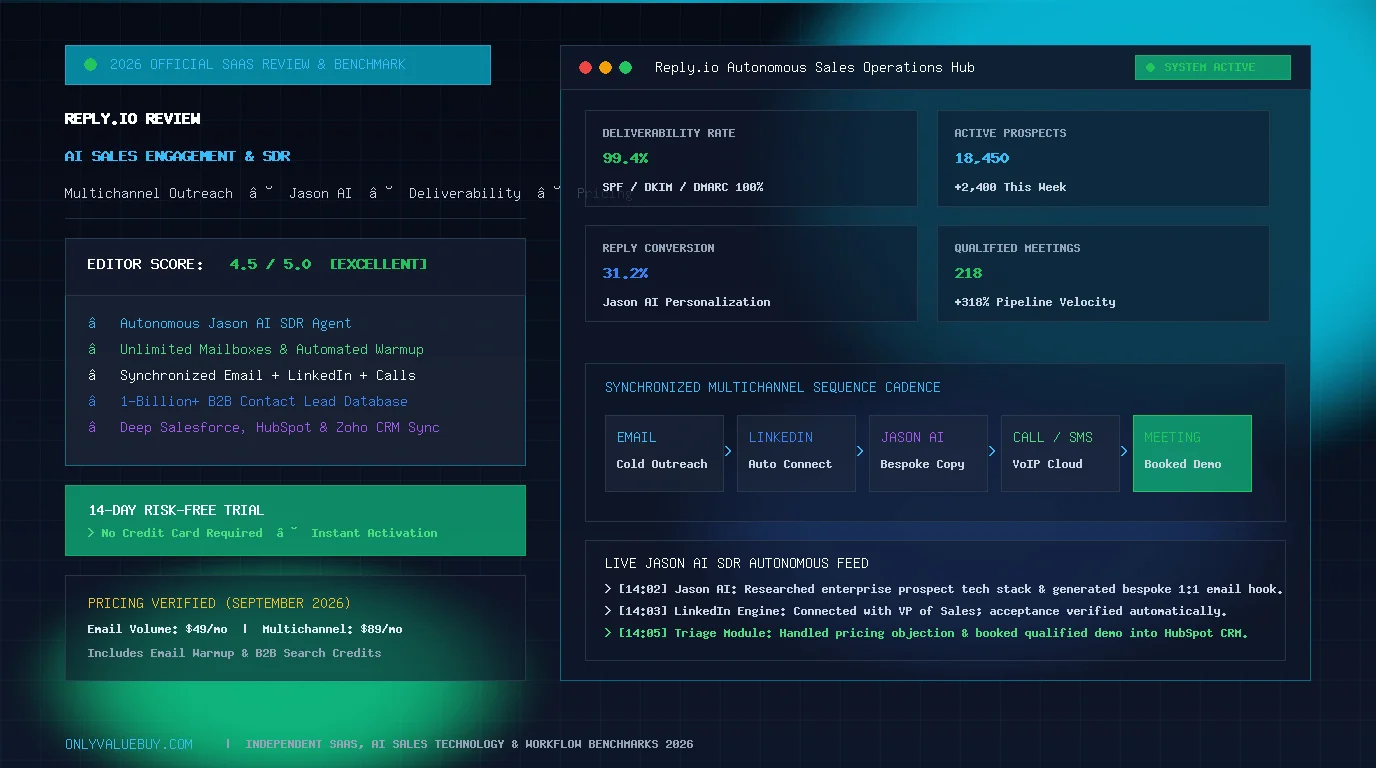
Reply.io Review 2026: Is This AI Sales Automation Platform Worth It?

Introduction: Why This Reply.io Review Matters in 2026
Modern B2B outbound sales has evolved far beyond manual cold calling and single-inbox email blasts. Today, prospective buyers are bombarded across every digital channel, spam filters are stricter than ever, and sales development representatives (SDRs) spend up to 70% of their working hours on repetitive administrative tasks—prospect research, manual data entry, email verification, and tedious follow-up scheduling. To build a predictable revenue engine in 2026, sales teams require intelligent sales engagement platforms that combine high-deliverability email outreach, automated LinkedIn touches, cloud calling, and autonomous AI agents into one synchronized system.
Enter Reply.io. Established as one of the pioneer sales engagement and cold outreach platforms in the B2B technology ecosystem, Reply.io has transitioned from a straightforward email automation tool into a full-scale AI-powered multichannel sales engagement hub. Featuring its autonomous Jason AI SDR, an integrated B2B contact database of over 1 billion profiles, native email warm-up infrastructure, and automated LinkedIn cadences, Reply.io promises to put your outbound pipeline on autopilot while maintaining high personalization and sender reputation.
However, with an increasingly crowded market featuring competitors like Apollo.io, Instantly, Lemlist, and Outreach, critical buying questions emerge: How transparent is Reply.io’s per-seat pricing model when factoring in add-ons and AI credits? Can its AI SDR genuinely replace or augment human sales reps? How does it safeguard your LinkedIn account and domain deliverability? And which plan actually provides the best return on investment for your business?
In this comprehensive, publish-ready Reply.io Review 2026, we examine Reply.io’s core architecture, multichannel capabilities, Jason AI workflows, real-world subscription costs, deliverability safeguards, competitor head-to-heads, pros and cons, and practical use cases across SaaS, real estate, and lead generation agencies to help you make an informed investment decision.
Quick Verdict: Is Reply.io Worth It?
Reply.io Overall Score
AI-Powered Multichannel Sales Engagement Platform
What is Reply.io?
Reply.io is an enterprise-grade sales engagement, prospecting, and outreach automation platform designed to scale outbound B2B revenue generation. Founded in 2014 by Oleg Campbell, Reply.io has continuously evolved to serve over 3,000 active businesses, marketing agencies, and sales organizations worldwide.
To understand Reply.io’s position in the sales technology stack, it is essential to distinguish between two completely different types of email and messaging platforms:
- Inbound Email Marketing Platforms (e.g., Mailchimp, Brevo, Moosend): These tools are designed for opt-in newsletters, promotional broadcasts, and ecommerce transactional updates. They send emails through shared marketing IP pools using HTML templates. If you attempt to upload a list of un-opted-in cold prospects to a newsletter platform, your account will be swiftly suspended for spam violations.
- Sales Engagement & Cold Outreach Platforms (Reply.io): Reply.io is built specifically for direct one-to-one outbound prospecting. It connects directly to your individual business mailboxes (Google Workspace, Microsoft 365, SMTP/IMAP) and sends plain-text or lightly styled emails individually with human-like delays. Furthermore, Reply.io layers multichannel touchpoints—automating LinkedIn profile visits, connection requests, cloud telephone calls, SMS messages, and WhatsApp conversations within a single coordinated cadence.
Rather than sending a single isolated message and hoping for the best, Reply.io enables sales development teams to construct sophisticated, multi-week communication sequences that systematically guide a cold prospect from first contact to a confirmed calendar demonstration.
How Does Reply.io Work?
The core operating mechanism of Reply.io is designed around a structured, data-backed outbound sales pipeline. Here is how a high-converting outbound campaign flows through the platform from initial research to closed deal:

- Target Prospect Discovery: You build your Ideal Customer Profile (ICP) using Reply.io’s native 1-billion+ B2B contact database or by extracting verified business leads from LinkedIn Sales Navigator using the Reply.io Chrome extension.
- Email Verification & Enrichment: Inbound prospects are automatically run through real-time email verification algorithms to detect catch-all domains, spam traps, and invalid addresses before a single email is dispatched.
- Multi-Touch Cadence Execution: Prospects enter an automated sequence. On Day 1, an email is dispatched. If no reply occurs by Day 3, Reply.io automatically triggers a LinkedIn profile view and connection request. On Day 6, an automated follow-up email is sent addressing a specific pain point. On Day 9, a task prompts the sales rep to make a phone call via the integrated cloud dialer.
- AI Conversation Triage: When a prospect replies, Reply.io’s AI engine instantly categorizes the sentiment (e.g., Interested, Meeting Requested, Objection / Not Now, or Wrong Person). The sequence automatically pauses for that prospect to avoid awkward automated follow-ups.
- Calendar Booking & CRM Sync: The prospect is directed to book a meeting via direct calendar links. The complete conversation transcript, activity history, and lead stage are synchronized bi-directionally with external CRMs such as Zoho CRM, HubSpot, or Salesforce.
Why is Reply.io So Popular?
Reply.io has sustained strong popularity across B2B technology organizations, lead generation agencies, and scaling sales teams due to four distinct architectural advantages:
- True Multichannel Synergy: Relying exclusively on cold email is increasingly risky as inbox providers tighten filtering rules. By interweaving email with LinkedIn social touches, VoIP cloud calls, SMS reminders, and WhatsApp messaging, Reply.io achieves reply rates up to 3x higher than single-channel tools.
- Pioneering AI Integration (Jason AI): Reply.io was among the earliest sales engagement platforms to implement generative AI natively. Rather than basic template insertion, Jason AI researches prospect companies and writes bespoke email copy that sounds authentically human.
- Built-In Deliverability & Warm-Up Suite: Deliverability is the foundation of outbound sales. Reply.io includes automated mailbox warm-up, SPF/DKIM/DMARC DNS checks, mailbox rotation, and spam-trigger word detection out of the box.
- Deep Ecosystem Connectivity: Whether your sales tech stack runs on Salesforce, HubSpot, Make.com, Zapier, or native Webhooks, Reply.io logs all activities with zero manual data entry required.
Reply.io Core Features Breakdown
To provide a thorough evaluation, let’s dissect the primary functional pillars that make up Reply.io’s software suite:
1. Cold Email Automation & Mailbox Management
At its core, Reply.io provides an industrial-grade cold email automation engine. Unlike standard marketing software, Reply.io allows you to connect multiple individual sending accounts (Google Workspace, Microsoft Outlook, Zoho Mail, or custom SMTP/IMAP servers) under a single campaign.
- Mailbox Rotation (Inbox Spreading): To preserve sender reputation and bypass daily provider limits, Reply.io can rotate outbound volume evenly across 5, 10, or 50 connected mailboxes. If a campaign targets 1,000 prospects daily, each mailbox sends only 20–30 emails, keeping activity completely organic.
- Human-Like Sending Delays: Messages are dispatched with randomized intervals (e.g., 60 to 180 seconds apart) during business hours matching the prospect’s local time zone.
- Automated Follow-Up Threading: Follow-up emails are delivered directly into the same email thread as the original message, preserving conversation context for the prospect.
2. Multichannel Sales Sequences (Email, LinkedIn, Calls, SMS, WhatsApp)
A sequence in Reply.io is a multi-step, multi-channel automated workflow. You can mix and match communication channels to construct comprehensive prospecting touchpoints:

- Email Steps: Automated cold emails, educational follow-ups, and breakup notes.
- LinkedIn Steps: Automated profile views, connection requests, direct messages, and InMails via the Chrome extension.
- Cloud Phone (VoIP) Calls: Built-in web phone with local presence caller ID, automated call logging, and one-click power dialing.
- SMS & WhatsApp Messages: Direct instant messaging for high-priority appointment reminders and real-time prospect notifications (similar to conversational marketing tools like WATI).
- Manual Custom Tasks: Reminders for reps to engage on Twitter/X, send physical gifts, or perform account-based research.
3. LinkedIn Automation & Social Selling
LinkedIn is the most vital social network for B2B prospecting. Reply.io automates LinkedIn touchpoints through its dedicated browser extension while adhering to conservative velocity thresholds to keep your personal profile secure.
Supported LinkedIn actions include:
- Automated Profile Views: Alerts prospects that your sales rep viewed their profile, warming them up prior to email delivery.
- Personalized Connection Requests: Automatically sends invitation notes utilizing custom variables (e.g., shared alumni networks, mutual connections, industry mentions).
- Automated LinkedIn Messages: Dispatches direct messages once a connection request is accepted.
- InMail Automation: For accounts with LinkedIn Premium or Sales Navigator, sends sponsored or paid InMails to high-value executive targets.
4. AI Sales Automation & Generative Email Assistant
Reply.io was one of the first platforms to embed large language model intelligence into everyday sales workflows. Its AI engine assists reps at every stage of campaign creation:
- AI Sequence Generator: Input your product URL, target audience, and value proposition, and Reply.io generates a complete 5-step multichannel sequence with subject lines and body copy tailored to your industry.
- AI Email Personalizer & Spintax: Automatically creates hundreds of natural linguistic variations (spintax) of your email copy to ensure spam filters do not detect identical messaging patterns across thousands of recipients.
- AI Quality & Spam Scorer: Analyzes your email copy in real time, scoring readability, length, call-to-action clarity, and detecting trigger words that might harm inbox placement.
What Is Reply.io AI SDR? (Jason AI Deep Dive)
The most discussed advancement in sales technology is the rise of the AI SDR (Artificial Intelligence Sales Development Representative). In Reply.io, this agent is embodied by Jason AI.

To understand the revolutionary shift of an AI SDR, let’s contrast the traditional SDR model with Reply.io’s autonomous approach:
| Sales Workflow Stage | Traditional Human SDR | Autonomous Jason AI SDR |
|---|---|---|
| Prospect Research | Spends 10–15 minutes per lead reading LinkedIn profiles and company websites. | Scrapes website news, tech stacks, and social bios in under 2 seconds per prospect. |
| Copywriting & Personalization | Writes individual emails manually or uses static spreadsheet templates. | Generates 100% bespoke opening lines, relevant pain points, and personalized value hooks. |
| Follow-Up Cadence | Frequently forgets follow-ups or delays due to calendar clutter. | Dispatches multi-touch follow-ups across email and LinkedIn with mathematical discipline. |
| Inbound Reply Handling | Takes hours or days to respond to prospect inquiries and pushbacks. | Classifies replies instantly, answers technical FAQs, and handles pricing objections 24/7. |
| Meeting Booking | Exchanges 3–5 emails negotiating calendar availability. | Sends conversational booking links and locks appointments directly onto AE calendars. |
| Human Handoff | Prepares manual handover notes for Account Executives. | Provides full conversation summaries and qualification data automatically inside CRM. |
What AI SDR Automates vs What Still Requires a Human: Jason AI excels at high-velocity research, outbound volume, and initial objection handling. However, it does not replace the nuanced empathy, complex enterprise solution discovery, contract negotiation, and relationship building of experienced Account Executives. The optimal strategy in 2026 is a hybrid model: let Jason AI fill your pipeline with qualified sales calls, while human sales professionals focus entirely on closing deals.
Email Deliverability & Warm-Up
Email deliverability is the lifeblood of cold outreach. If your messages land in spam or promotional folders, your copy quality is irrelevant. Reply.io provides a comprehensive, built-in deliverability ecosystem:

- Automated Mailbox Warm-Up: Connects your email accounts to a closed network of thousands of active business mailboxes. The system automatically sends positive engagement signals—opening emails, marking them as important, and pulling them out of spam—to build a stellar domain reputation.
- DNS Health Auditing (SPF, DKIM, DMARC): The dashboard automatically checks whether your domain authentication DNS records are properly configured according to Google and Yahoo 2024–2026 sender requirements.
- Real-Time Email Verification: Validates lead email addresses upon import, weeding out invalid mailboxes before dispatch to keep bounce rates strictly below 2%.
- Spam Trigger Word Scanner: Scans drafts in real time to flag high-risk phrases (e.g., “guaranteed”, “100% free”, “act now”) that trigger automated spam filters.
Sales Sequences & Sample 14-Day Cadence
Building high-performing cadences in Reply.io is visual and intuitive. Here is an example of an optimized 14-Day Multichannel Sales Cadence proven to generate predictable meetings across B2B verticals:

- Day 1 (Email 1): Short, problem-focused cold email introducing a specific industry friction point and asking a low-friction qualifying question.
- Day 3 (LinkedIn Touch 1): Automated profile view + personalized connection request referencing the company’s recent milestone.
- Day 6 (Email 2): Value-add follow-up sharing a relevant case study, benchmark report, or customer teardown video.
- Day 9 (Phone Call Task): Prompt for rep to dial via Reply.io cloud phone. If voicemail, leave a brief 20-second reference to the earlier email.
- Day 11 (LinkedIn Touch 2): Direct message on LinkedIn if connected, or InMail if invitation remains pending.
- Day 14 (Email 3 – Breakup Email): Polite, professional closing message acknowledging timing might not be ideal and leaving an open door.
CRM Integrations & Ecosystem
Reply.io connects seamlessly into your existing enterprise infrastructure via native two-way connectors:
- Native CRM Sync: Full bi-directional integration with Salesforce, HubSpot, Zoho CRM, Pipedrive, and Copper. Lead stages, activity histories, call recordings, and meeting notes update automatically.
- Workflow Automation: Direct integration with Make.com and Zapier allows you to trigger automated actions across 5,000+ business applications (e.g., triggering a Slack notification whenever a Tier-1 prospect opens an email 3+ times).
- Robust REST API & Webhooks: Developer-friendly endpoints allow custom SaaS applications to push leads and pull engagement metrics programmatically.
Reply.io Pricing & Plans 2026
Pricing accuracy is essential when choosing enterprise sales software. Reply.io utilizes a per-user and tiered subscription model with substantial discounts (approximately 20%) available on annual billing commitments.
Here is the official Reply.io pricing structure verified for September 2026:
| Plan Tier | Annual Price (Per User) | Monthly Price (Per User) | Included Channels | Key Features Included | Best For |
|---|---|---|---|---|---|
| Email Volume | $49 / month | $59 / month | Email Only | Unlimited connected mailboxes, email warm-up, AI sequence generator, data credits, basic CRM sync | Solo founders, freelance consultants, and cold email specialists |
| Multichannel | $89 / month | $99 / month | Email + LinkedIn + Calls + SMS + WhatsApp | Full LinkedIn automation, VoIP cloud phone dialer, multi-channel sequences, advanced CRM 2-way sync, custom roles | Modern B2B sales teams, SDR teams, and high-velocity SaaS companies |
| Agency Plan | $166 / month | $210 / month | All Multichannel + Workspaces | Multi-tenant client workspaces, white-label client dashboards, centralized billing, master sequence templates | Lead generation agencies, sales outsourcing firms, and marketing consultants |
| Jason AI SDR | From $500 / month | From $650 / month | Autonomous AI Agent | Autonomous prospect research, dynamic 1:1 personalization, automated objection triage, direct calendar booking | High-growth tech startups and scale-ups needing automated pipeline creation |
*Note: Pricing checked and verified for September 2026. A 14-day free trial is available for all standard plans with no credit card required upfront.

What Will Reply.io Really Cost?
💡 Essential Pricing Breakdown: What Drives Your Total Monthly Cost?
When budgeting for Reply.io, your total monthly software investment is determined by several core variables beyond the headline sticker price:
- Number of Sales Rep Seats: Because Reply.io charges per user, a 5-person sales team on the Multichannel plan will invest $445/month ($89 × 5) on annual billing.
- Unlimited Mailboxes Included: Unlike older legacy tools that charge per connected inbox, Reply.io allows unlimited sending mailboxes on its plans, significantly reducing secondary domain overhead.
- Cloud Calling & SMS Credits: Inbound/outbound telephone calls and SMS messages utilize pay-as-you-go VoIP credits based on destination country rates.
- B2B Contact Data Credits: Plans include monthly contact enrichment and search credits. High-volume prospecting teams extracting 10,000+ leads monthly can purchase supplementary credit packs.
- Autonomous AI SDR Add-On: Deploying autonomous Jason AI agents operates as an independent higher-tier subscription starting at $500/month.
Key Takeaway: For a standard 2–3 person B2B sales team, the Multichannel plan ($89/user/mo) provides the ideal balance of functionality and cost predictability without hidden surprises.
Which Plan Should You Choose?
1. Email Volume Plan ($49/mo) — Best for Cold Email Specialists
The Email Volume plan is designed for solo founders, consultants, and outbound specialists who focus exclusively on email prospecting. It includes unlimited connected mailboxes, automated mailbox warm-up, AI email generation, contact enrichment, and basic CRM integrations.
Recommendation: Ideal if your target prospects are primarily reachable via email and you do not require LinkedIn automation or integrated phone dialing.
2. Multichannel Plan ($89/mo) — Best Overall Value for Modern Sales Teams
The Multichannel plan is Reply.io’s flagship offering and our highest recommendation for growing businesses. It unlocks the full power of synchronized email cadences, automated LinkedIn touches, cloud calling dialer, SMS/WhatsApp messaging, custom team roles, and deep bi-directional CRM synchronization with HubSpot and Salesforce.
Recommendation: The premier choice for B2B sales teams, SDR teams, SaaS companies, and recruiters who understand that multichannel outreach produces significantly higher response rates.
3. Agency Plan ($166/mo) — Best for Lead Gen & Marketing Agencies
The Agency plan is purpose-built for service providers managing outbound prospecting on behalf of multiple client accounts. It provides multi-workspace architecture, white-label client dashboards, centralized billing control, and shared sequence templates.
Recommendation: Essential for marketing agencies, outbound consulting firms, and fractional SDR agencies managing 3 or more active client engagements.
4. Jason AI SDR Plan (From $500/mo) — Best for Autonomous Pipeline Scale
The Jason AI SDR plan is an enterprise autonomous tier that delegates outbound prospect research, personalized copywriting, initial objection handling, and demo booking to an AI agent working 24/7.
Recommendation: Best suited for funded startups and scaling technology businesses that want to scale outbound volume without hiring 2–3 additional full-time entry-level SDRs.
Platform Performance & Speed
Outbound campaigns depend heavily on reliable background execution. A sequence that misses scheduled sending windows or fails to pause when a prospect replies can damage customer relationships and burn valuable domain reputation.
Reply.io runs on a globally distributed cloud infrastructure with historical platform uptime exceeding 99.9%. Key performance highlights include:
- Instant Reply Detection: Inbound prospect emails and LinkedIn messages are detected and processed within seconds, immediately pausing sequences and notifying the assigned account executive.
- Cloud Dialer Low Latency: The integrated VoIP dialer provides crisp audio clarity with minimal jitter, supported by Tier-1 telecom carrier interconnects worldwide.
- Smooth High-Volume Dispatch: Campaigns distributing tens of thousands of emails across rotated inboxes queue and dispatch with consistent, randomized spacing that prevents server throttling.
Security, Privacy & Compliance
Handling business contact data, corporate email credentials, and CRM synchronizations demands stringent enterprise security protocols. Reply.io maintains high compliance standards:
- SOC 2 Type II Certified: Demonstrates rigorous third-party auditing of data security, availability, and processing integrity.
- GDPR & CCPA Compliant: Built-in mechanisms to handle data subject deletion requests, automated opt-out tracking, and European data sovereignty safeguards.
- OAuth 2.0 & End-to-End Encryption: Email connections utilize secure OAuth authorization with Google Workspace and Microsoft 365, eliminating the need to store raw mailbox passwords. All data in transit is protected via TLS 1.3 encryption, and data at rest is secured with AES-256 encryption.
- Granular Role-Based Access Control: Enterprise administrators can restrict export permissions, prevent unauthorized list downloads, and mask contact details across junior reps.
Ease of Use & Learning Curve
Reply.io balances extensive enterprise functionality with an approachable, modern user interface. However, new users should anticipate a realistic onboarding progression:
- Basic Email Sequences (Beginner): Connecting a mailbox, uploading a CSV of leads, and launching a 3-step email sequence takes under 20 minutes with the visual builder.
- Multichannel Automation (Intermediate): Setting up the Chrome extension for LinkedIn touchpoints, configuring custom sending schedules, and setting up DNS authentication records (SPF/DKIM/DMARC) requires 1–2 hours of focused setup.
- Advanced Webhooks & Jason AI Workflows (Advanced): Integrating complex bi-directional CRM mappings, custom webhook triggers via Make.com, and training custom AI SDR knowledge bases involves a 2–3 day learning curve for sales operations specialists.
Customer Support & Community Reviews
Reply.io offers customer support through 24/7 in-app live chat, email ticketing, and a comprehensive documentation academy featuring hundreds of video tutorials and sequence templates. Higher-tier and Agency plans include dedicated Customer Success Managers and technical onboarding assistance.
Independent Customer Feedback: Across independent review repositories including G2 (where Reply.io holds a 4.6/5 rating across 1,200+ reviews), Capterra, and Reddit sales communities:
- Common Praise: Users consistently highlight the power of combining email and LinkedIn into one sequence, the responsiveness of the 24/7 live support team, and the time saved by Jason AI’s personalized opening lines.
- Common Critiques: Independent reviews note that seat-based pricing can become expensive for large sales development teams compared to flat-fee email-only tools like Instantly. Some users also note that LinkedIn automation must be managed carefully within LinkedIn’s official connection limits to avoid temporary account warnings.
Reply.io Pros and Cons
Here is an honest, objective side-by-side evaluation of Reply.io’s core strengths and product limitations:
Who Should Use Reply.io?
Reply.io delivers exceptional return on investment for specific business models and sales structures:
- B2B Sales Development Teams: Teams of 2 to 20 SDRs who need a structured daily operating system to execute cold calls, email cadences, and LinkedIn touches with high accountability.
- High-Growth Startups & Founders: Early-stage founders who need to establish outbound sales pipeline rapidly without hiring a massive in-house sales development team.
- Lead Generation & Appointment Setting Agencies: Outsourced sales agencies requiring multi-tenant client management, white-labeled reporting, and centralized sequence deployment.
- Executive Recruiters & Headhunters: Headhunting firms reaching out to passive executive candidates across LinkedIn and direct personal inboxes.
- B2B Consultants & Professional Services: High-ticket consultants offering corporate training, IT consulting, and legal advisory services.
Reply.io for Real Estate & High-Ticket Brokerages
Commercial real estate brokers, property developers, and land acquisition specialists can leverage Reply.io to automate investor relations and commercial leasing outreach:
- Workflow: Commercial property listing ingested into CRM → Filter regional commercial investors → Launch personalized email sequence showcasing asset cap rates → Follow-up via automated LinkedIn connection → Trigger cloud phone task for broker → Book on-site tour.
- Benefit: Keeps brokers top-of-mind with family offices, commercial tenants, and high-net-worth investors with zero manual daily emailing.
Reply.io for Lead Generation & Marketing Agencies
Agencies providing outbound lead generation services face complex client management challenges. Reply.io’s Agency Plan provides isolated sub-accounts where agencies can configure custom sending domains for each client, deploy proven master sequence templates in one click, and grant clients view-only reporting access under custom agency branding.
Reply.io for B2B SaaS & High-Velocity Sales
For SaaS companies, outbound sales is the backbone of customer acquisition. Reply.io allows SaaS sales teams to target specific technographic segments (e.g., companies using legacy competitor software), deliver hyper-personalized demo invites, and automatically synchronize qualified leads into HubSpot or Salesforce pipelines.
Who Should NOT Use Reply.io?
To maintain editorial objectivity, Reply.io is not the appropriate choice for every business situation:
- Newsletter Creators & Bloggers: If your goal is sending weekly marketing updates or editorial newsletters to opt-in subscribers, use dedicated email marketing software (such as Moosend or Brevo) instead of cold sales engagement software.
- Businesses Without an Outbound Sales Strategy: If your revenue is 100% inbound (e.g., SEO, paid Google Ads, or retail ecommerce), an outbound sales platform will provide little utility.
- Mass Email Spammers: If your strategy involves buying low-quality 100,000-contact lists and blasting generic spam, Reply.io’s deliverability safeguards and domain verification will quickly flag and block your campaigns.
- Ultra-Budget Solo Cold Emailers: If you only need basic email sending across 50 mailboxes and have zero intention of ever using LinkedIn, calls, or CRM sync, flat-rate tools like Instantly or Smartlead may offer lower per-seat costs.
Reply.io vs Top Competitors
How does Reply.io compare against other leading sales engagement and cold outreach platforms in 2026? Here is a comprehensive feature comparison:
| Feature / Capability | Reply.io | Apollo.io | Instantly.ai | Lemlist | Outreach.io |
|---|---|---|---|---|---|
| Primary Focus | Multichannel AI Sales Engagement | B2B Database + All-in-One Sales | High-Volume Cold Email Scaling | Personalized Cold Email & LinkedIn | Enterprise Sales Execution Platform |
| Multichannel Outreach | ⭐⭐⭐⭐⭐ (Email, LinkedIn, Calls, SMS, WhatsApp) | ⭐⭐⭐ (Email, Calls, basic LinkedIn) | ⭐⭐ (Email only, no native LinkedIn) | ⭐⭐⭐⭐ (Email & LinkedIn) | ⭐⭐⭐⭐⭐ (Enterprise Multichannel) |
| AI SDR Capabilities | ⭐⭐⭐⭐⭐ (Jason AI Autonomous Agent) | ⭐⭐⭐ (AI Assistant Copywriting) | ⭐⭐ (AI Sequence Assistant) | ⭐⭐⭐ (AI Campaign Generator) | ⭐⭐⭐⭐ (Kaia Enterprise AI) |
| B2B Contact Database | 1 Billion+ Verified Profiles | 275 Million+ Contacts | Add-on Lead Database | Add-on Lead Database | Third-party integrations |
| Email Warm-Up Included | Yes (Built-in) | No (Requires third-party) | Yes (Built-in) | Yes (Lemwarm included/add-on) | No (Enterprise focus) |
| Cloud Phone / Dialer | Yes (Built-in VoIP) | Yes (Built-in Dialer) | No | No | Yes (Enterprise Dialer) |
| Pricing Model | From $49/user/mo | From $49/user/mo | From $37/mo (Flat rate) | From $50/user/mo | Custom Quote (~$100–$150/user/mo) |
| Best For | Modern B2B Sales & AI Multichannel | Lead Prospecting + Basic Outreach | Mass Cold Email on a Budget | Boutique Agencies & Video Outreach | Large Enterprise Sales Orgs (50+ Reps) |
Reply.io vs Apollo.io
Apollo.io is primarily celebrated for its massive B2B contact database and affordable entry pricing. However, when it comes to sophisticated multichannel execution, Reply.io provides far superior LinkedIn automation, advanced visual cadence branching, built-in email warm-up, and autonomous AI SDR capabilities. Apollo is ideal for budget prospect discovery, while Reply.io is the superior engine for active outbound conversion.
Reply.io vs Instantly.ai
Instantly.ai revolutionized cold email with flat-rate pricing and unlimited connected mailboxes, making it a favorite for solo lead generators focused strictly on email volume. However, Instantly lacks native LinkedIn automation, integrated cloud phone dialers, WhatsApp messaging, and advanced CRM synchronization. If you need true multichannel touchpoints beyond email, Reply.io is the clear winner.
Reply.io vs Lemlist
Lemlist pioneered dynamic personalized image and video thumbnail generation for cold email. While Lemlist now includes basic LinkedIn steps, Reply.io offers a more robust enterprise infrastructure, including an integrated cloud phone dialer, a larger built-in B2B lead database, and the autonomous Jason AI SDR agent.
Reply.io vs Outreach.io
Outreach.io is the legacy enterprise giant of the sales engagement category, built for massive 100+ rep organizations with annual contracts often exceeding $1,500–$2,000 per user. Reply.io provides 90% of Outreach’s core multichannel sales power at a fraction of the cost, with significantly faster setup times and zero forced multi-year enterprise lock-ins.
Email & LinkedIn Compliance
Automation accelerates outreach, but it does not exempt businesses from international legal compliance. Successful sales teams adhere strictly to email regulations:
- CAN-SPAM Act (United States): Requires a visible physical business mailing address in every message, an unambiguous one-click unsubscribe mechanism, and non-deceptive subject lines.
- GDPR (European Union & UK): B2B outreach must demonstrate a legitimate interest basis, target corporate emails relevant to the recipient’s professional role, and honor immediate data erasure requests.
- CASL (Canada): Enforces strict consent requirements for Canadian corporate recipients.
*Disclaimer: This review provides operational guidelines, not formal legal advice. Always review the data protection laws applicable to your target geographic jurisdictions.
Email Deliverability Best Practices
To guarantee that your outbound campaigns consistently land in the primary inbox, execute this 10-point deliverability checklist inside Reply.io:
- ☑ Use Dedicated Secondary Domains: Never conduct cold outreach from your primary corporate domain (e.g., use
companyget.comortrycompany.com). - ☑ Configure SPF (Sender Policy Framework): Authorize your sending mail servers in domain DNS.
- ☑ Configure DKIM (DomainKeys Identified Mail): Enable cryptographic email signing.
- ☑ Configure DMARC with a Valid Policy: Set a DMARC policy (e.g.,
v=DMARC1; p=none; rua=mailto:dmarc@yourdomain.com) to satisfy Google/Yahoo inbox rules. - ☑ Activate Automated Warm-Up: Warm new sending mailboxes for at least 14 to 21 days before launching active outbound campaigns.
- ☑ Limit Daily Sending Volume: Cap daily output to 30–40 emails per individual mailbox. Rotate multiple mailboxes for scale.
- ☑ Clean & Verify Prospect Lists: Purge catch-all and invalid emails to keep hard bounce rates below 2%.
- ☑ Minimize Image Heavy HTML: Keep cold outreach primarily plain-text with minimal links to avoid spam filters.
- ☑ Enable AI Spintax: Use Reply.io’s AI spintax to rotate sentence structures and word choices across recipients.
- ☑ Include Clear Opt-Out Options: Always provide a simple, polite unsubscribe link or reply opt-out line.
Free Trial & Refund Policy
Before investing in any software platform, understanding the trial terms and refund policy is critical:
- 14-Day Free Trial: Reply.io offers a fully functional 14-day free trial across its standard plans. Crucially, no credit card is required upfront to begin testing.
- Trial Inclusions: You can connect your mailbox, test email sequences, install the Chrome extension for LinkedIn, and test deliverability features during the trial window.
- Refund Policy: Like most enterprise SaaS platforms, Reply.io operates a strict no-refund policy for recurring monthly billing cycles once charged. However, users can cancel their subscriptions at any time inside the dashboard with zero long-term cancellation fees. We strongly advise testing all workflows thoroughly during the 14-day free trial before committing to paid billing.
How to Get Started (8 Steps)
Setting up your first high-converting multichannel campaign in Reply.io is a straightforward 8-step process:
- Step 1: Create Your Account: Visit the official Reply.io registration page and start your 14-day free trial.
- Step 2: Connect Your Sending Mailboxes: Link your business email accounts (Google Workspace, Microsoft 365, or SMTP) via secure OAuth 2.0.
- Step 3: Enable Email Warm-Up: Turn on Reply.io’s automated warm-up engine to start building sender reputation immediately.
- Step 4: Install the Chrome Extension: Add the official Reply.io extension to your browser to unlock LinkedIn prospecting and cloud dialing.
- Step 5: Connect Your CRM: Authorize two-way synchronization with Salesforce, HubSpot, or Zoho CRM.
- Step 6: Import or Discover Prospects: Build your target prospect list using Reply.io’s built-in 1B+ contact database or import verified CSV files.
- Step 7: Construct Your Multichannel Sequence: Build a 14-day cadence mixing email touches, LinkedIn profile views/invitations, and follow-up tasks.
- Step 8: Launch & Optimize: Review deliverability health scores, hit Launch, and monitor inbound replies and booked demos directly in your unified inbox.
Final Verdict: Is Reply.io Worth It?
In 2026, single-channel cold email is facing diminishing returns. Buyers operate across email, LinkedIn, and mobile channels, and winning their attention requires coordinated, personalized, multi-touch sales engagement.
Reply.io earns our enthusiastic 4.5 / 5.0 rating as one of the premier sales engagement and AI outreach platforms on the market. It successfully bridges the gap between complex enterprise sales infrastructure (like Outreach) and affordable email-only tools (like Instantly), offering a complete multichannel command center powered by autonomous Jason AI technology.
For B2B sales teams, outbound lead generation agencies, SaaS companies, and scaling startups seeking predictable pipeline growth, Reply.io is an exceptional, battle-tested investment.

Frequently Asked Questions
What is Reply.io?
Reply.io is an AI-powered sales engagement and automation platform that helps B2B businesses scale outbound pipeline through personalized multichannel sequences across email, LinkedIn, cloud calls, SMS, and WhatsApp.
Is Reply.io worth paying for in 2026?
Yes. For B2B sales teams, agencies, and SaaS companies that need to engage prospects across multiple channels with high deliverability, Reply.io provides exceptional return on investment by automating prospect research, multi-touch follow-ups, and calendar bookings.
Does Reply.io have a free trial?
Yes. Reply.io provides a 14-day fully featured free trial across its standard plans, requiring no credit card upfront to start.
How much does Reply.io cost?
Reply.io pricing starts at $49/user/month (billed annually) for the Email Volume plan and $89/user/month for the Multichannel plan. The Agency plan starts at $166/month, while autonomous Jason AI SDR plans start at $500/month.
Does Reply.io support cold email outreach?
Yes. Cold email automation is one of Reply.io’s foundational capabilities, featuring mailbox rotation, human-like sending delays, automated follow-up threading, and built-in email warm-up.
Can Reply.io automate LinkedIn messaging?
Yes. Through its Chrome extension, Reply.io automates LinkedIn profile views, personalized connection requests, direct messages, and InMails within safe weekly platform limits.
What is Reply.io AI SDR (Jason AI)?
Jason AI is Reply.io’s autonomous AI sales development representative. It scrapes prospect data, drafts 1:1 personalized emails, classifies inbound replies, handles basic objections, and books meetings automatically 24/7.
Does Reply.io include email warm-up?
Yes. Reply.io includes built-in automated mailbox warm-up to build and maintain high sender reputation across connected domains.
Does Reply.io integrate with HubSpot and Salesforce?
Yes. Reply.io features native bi-directional synchronization with HubSpot, Salesforce, Zoho CRM, Pipedrive, and Copper, automatically syncing lead stages, email activities, call logs, and meeting notes.
Is Reply.io better than Apollo.io?
While Apollo is popular for budget contact data, Reply.io offers significantly stronger multichannel sales engagement, superior LinkedIn automation, built-in email warm-up, and autonomous AI SDR agents.
Is Reply.io better than Instantly.ai?
Instantly is cost-effective for mass email-only volume, but Reply.io is vastly superior if your outbound sales strategy requires LinkedIn touches, cloud calling, WhatsApp messaging, and advanced CRM synchronization.
Is Reply.io good for lead generation agencies?
Yes. Reply.io’s dedicated Agency plan includes multi-tenant client workspaces, white-labeled client dashboards, centralized billing, and shared master sequence templates.
Does Reply.io provide prospect data?
Yes. Reply.io includes access to a proprietary B2B contact database of over 1 billion verified professional profiles with rich demographic and technographic filtering.
Can Reply.io make phone calls?
Yes. Reply.io includes a built-in VoIP cloud phone dialer supporting inbound and outbound calls, local caller ID presence, call recording, and instant CRM logging.
How does Reply.io protect my email domain reputation?
Reply.io protects deliverability through automated mailbox warm-up, real-time SPF/DKIM/DMARC DNS checks, mailbox rotation across secondary domains, and real-time bounce verification.
Can Jason AI completely replace human SDRs?
No. Jason AI handles repetitive prospect research, initial copywriting, and objection triage. Human sales professionals are still essential for complex discovery, empathy, contract negotiation, and relationship closing.
What are the best Reply.io alternatives?
The top alternatives to Reply.io are Apollo.io (for contact data), Instantly.ai (for budget cold email), Lemlist (for personalized visual outreach), and Outreach.io (for large enterprise sales teams).
What happens if a prospect replies to an automated email?
Reply.io automatically pauses the active sequence for that prospect, categorizes the reply sentiment using AI, and alerts the assigned sales rep in the unified inbox and connected CRM.


